Dahua 75-Inch Smart Interactive Whiteboard for Classrooms and Boardrooms – Supply and Installation
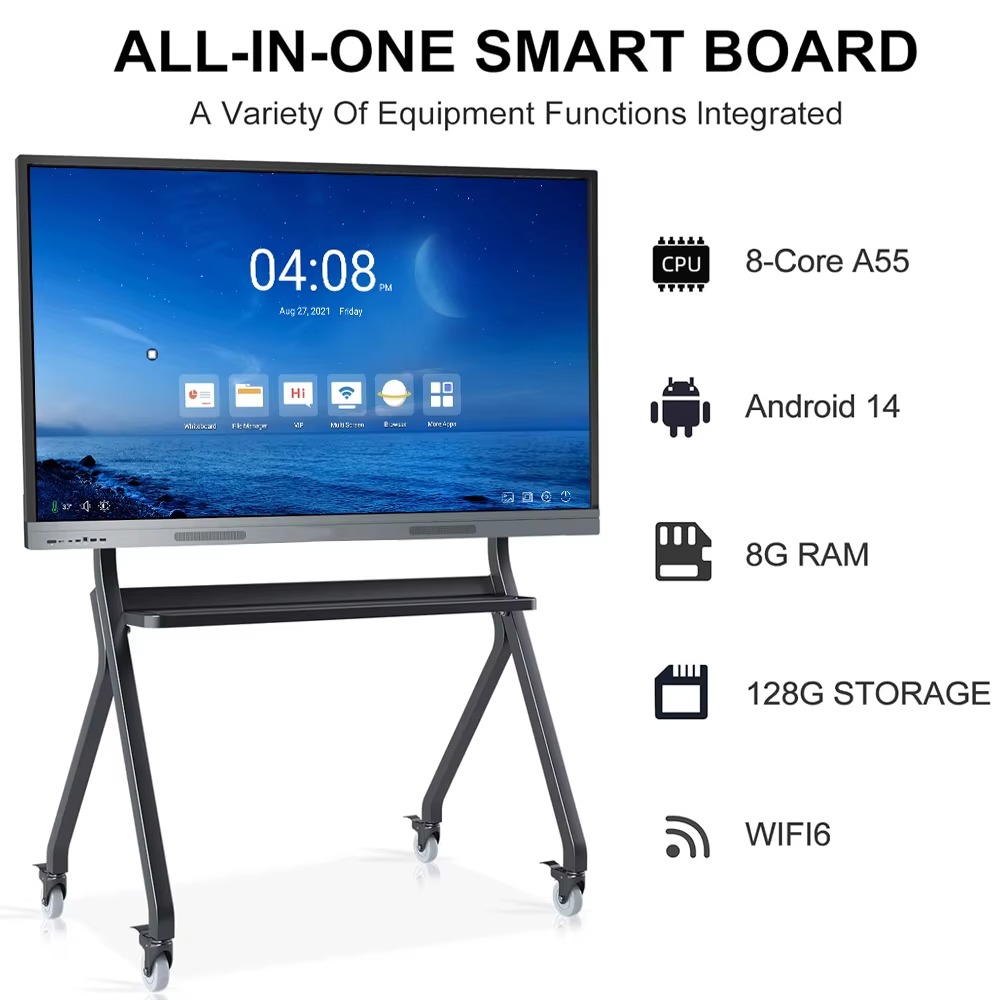
The Dahua 75-inch Smart Interactive Whiteboard is a large-format 4K interactive display designed for modern classrooms, boardrooms, training rooms, meeting rooms and collaborative workspaces. It combines a high-resolution touchscreen display, digital whiteboarding, presentation capabilities, multimedia playback and wireless screen sharing in one professional interactive panel.
Boardtac Solutions supplies and installs Dahua interactive whiteboards in Kenya, providing customers with the display, mounting solution, configuration, installation and commissioning according to the requirements of the room.
Whether you are equipping a school classroom, university lecture room, corporate boardroom, training centre or meeting room, a 75-inch interactive display provides a more engaging way to present information, explain concepts, collaborate on documents and share content.
What Is a 75-Inch Interactive Whiteboard?
A smart interactive whiteboard is a large touchscreen display that allows users to write, draw, annotate, present documents, display videos and interact with digital content directly on the screen.
Unlike a conventional projector and whiteboard setup, an interactive display does not require a separate projection surface. The content is displayed directly on the panel, making it easier to see in rooms with ambient lighting.
The Dahua 75-inch interactive whiteboard combines a large 4K display with interactive touch functionality and smart features for education and business applications.
Dahua 75-Inch 4K Display
The 75-inch screen provides a large viewing area suitable for classrooms and meeting rooms where several people need to see the content simultaneously.
With 4K Ultra HD resolution of 3840 × 2160, presentations, diagrams, spreadsheets, videos, images and teaching materials can be displayed with high levels of detail.
The large screen is particularly useful where a projector may be affected by room lighting, shadows or limited viewing angles.
Interactive Digital Whiteboarding
The interactive whiteboard allows teachers, trainers and presenters to write directly on the screen using a compatible stylus or touch input.
Users can:
- Write notes during lessons and presentations.
- Draw diagrams and illustrations.
- Highlight important information.
- Annotate documents and presentations.
- Erase or modify content.
- Work collaboratively on the same screen.
- Save digital notes for future reference.
This makes the display useful not only as a presentation screen but also as a collaborative working tool.
Wireless Screen Sharing
Wireless screen sharing allows content from compatible laptops, tablets and smartphones to be displayed on the interactive panel.
This can be useful in classrooms where teachers need to move between different teaching devices or in boardrooms where several participants need to present information during a meeting.
Instead of repeatedly changing HDMI cables between presenters, compatible devices can share their screens wirelessly, helping make meetings and presentations more efficient.
Applications in Schools and Classrooms
The Dahua 75-inch interactive whiteboard can be used in primary schools, secondary schools, colleges, universities, training centres and other educational institutions.
Typical classroom applications include:
- Digital teaching.
- Interactive lessons.
- Presentation of PowerPoint and PDF materials.
- Educational videos.
- Diagrams and illustrations.
- Mathematics and scientific demonstrations.
- Internet-based teaching resources.
- Collaborative student activities.
- Digital annotation.
- Teacher presentations.
A properly installed interactive panel can replace or complement a traditional projector and whiteboard, depending on the school’s teaching requirements.
Applications in Boardrooms and Meeting Rooms
For businesses and organisations, the interactive display can be used as a presentation and collaboration screen.
Typical boardroom applications include:
- Management presentations.
- Strategy meetings.
- Project reviews.
- Financial presentations.
- Business planning.
- Brainstorming sessions.
- Document review.
- Training and workshops.
- Video meeting presentations.
- Collaborative discussions.
The touchscreen functionality allows participants to interact with information rather than simply viewing a static presentation.
Interactive Whiteboard for Video Conferencing
An interactive whiteboard can also form part of a modern video conferencing room.
When combined with a compatible conference camera, microphone and conferencing platform, the display can provide a large screen for remote participants while allowing people in the room to interact with shared documents and presentations.
For boardrooms requiring an integrated video conferencing solution, Boardtac Solutions can assess the room and recommend compatible cameras, microphones, speakers, connectivity and mounting equipment.
Boardtac Solutions Supply and Installation
Boardtac Solutions does not simply supply the screen and leave the customer to determine how it should be installed.
Our approach starts with understanding the intended application and the room where the interactive display will be installed.
Depending on the project, our installation service can include:
- Site assessment.
- Interactive display selection.
- Wall or stand mounting.
- Display installation.
- Power and connectivity planning.
- HDMI and network connectivity.
- Wireless network configuration where required.
- External computer or Windows OPS integration.
- Video conferencing equipment integration.
- Screen sharing configuration.
- Testing and commissioning.
- User orientation.
For schools, offices and larger organisations, we can also assess multiple rooms and develop a consistent installation approach across the facility.
Wall Mounting or Mobile Stand?
The 75-inch interactive whiteboard can be installed on a suitable wall or mounted on a compatible mobile floor stand.
A wall-mounted installation is suitable where the display will remain permanently in one classroom or meeting room.
A mobile stand may be more appropriate where the display needs to be moved between training rooms, classrooms or meeting spaces.
The correct mounting option depends on the room layout, wall construction, viewing height and how the display will be used.
What Should You Consider Before Buying an Interactive Whiteboard?
Choosing an interactive display should not be based on screen size alone.
Before purchasing a 75-inch interactive whiteboard, organisations should consider:
Room size: A 75-inch display is suitable for many medium and large classrooms and meeting rooms, but the viewing distance should be considered.
Mounting location: The wall must be suitable for supporting the display and mounting bracket.
Power: A suitable electrical supply should be available near the installation point.
Network connectivity: Network access may be required for internet-based applications, updates, screen sharing and other smart functions.
External computer requirements: Some organisations may require a Windows OPS computer or external PC for specific Windows applications.
Video conferencing: If the display will be used for online meetings, the camera, microphone and speaker requirements should be considered alongside the interactive panel.
Room acoustics: Larger boardrooms and classrooms may require additional audio equipment to ensure clear communication.
User requirements: Schools, training centres and corporate offices may require different software, connectivity and integration options.
Why Choose Boardtac Solutions?
Boardtac Solutions provides technology solutions based on the customer’s actual requirements rather than simply supplying individual hardware components.
For an interactive classroom or boardroom project, our team can assess the environment, understand how the display will be used and recommend the appropriate equipment and installation arrangement.
Our services can cover the complete deployment, from site assessment and equipment supply to installation, configuration, testing and handover.
This is particularly useful for organisations that want an operational solution rather than simply purchasing an interactive screen.
Who Can Benefit From a Dahua 75-Inch Interactive Whiteboard?
The display is suitable for:
- Primary and secondary schools.
- Universities and colleges.
- Training institutions.
- Corporate offices.
- Boardrooms.
- Conference rooms.
- Training rooms.
- Government offices.
- NGOs and development organisations.
- Hospitals and healthcare training facilities.
- Churches and conference facilities.
- Professional training centres.
Supply and Installation in Kenya
Boardtac Solutions supplies and installs Dahua interactive whiteboards in Kenya, including 75-inch models for classrooms, boardrooms, training rooms and meeting spaces.
If you are planning to install an interactive classroom or boardroom display, we can assess your requirements and recommend the appropriate screen size, mounting method, connectivity and supporting equipment.
Contact Boardtac Solutions for Dahua 75-inch interactive whiteboard supply, installation and configuration in Kenya.