Understanding the “Error! Reach ATT Data Max Capacity” on ZKTeco Devices and How Boardtac Solutions Can Help.
Time attendance systems have become essential tools for modern businesses in Kenya as they help streamline employee attendance, improve payroll accuracy, and enhance security. However, like any digital system, biometric devices can run into technical issues that interrupt operations. One of the most common errors displayed on ZKTeco biometric terminals is the message “Failed to verify. Error! Reach ATT data max capacity.”.
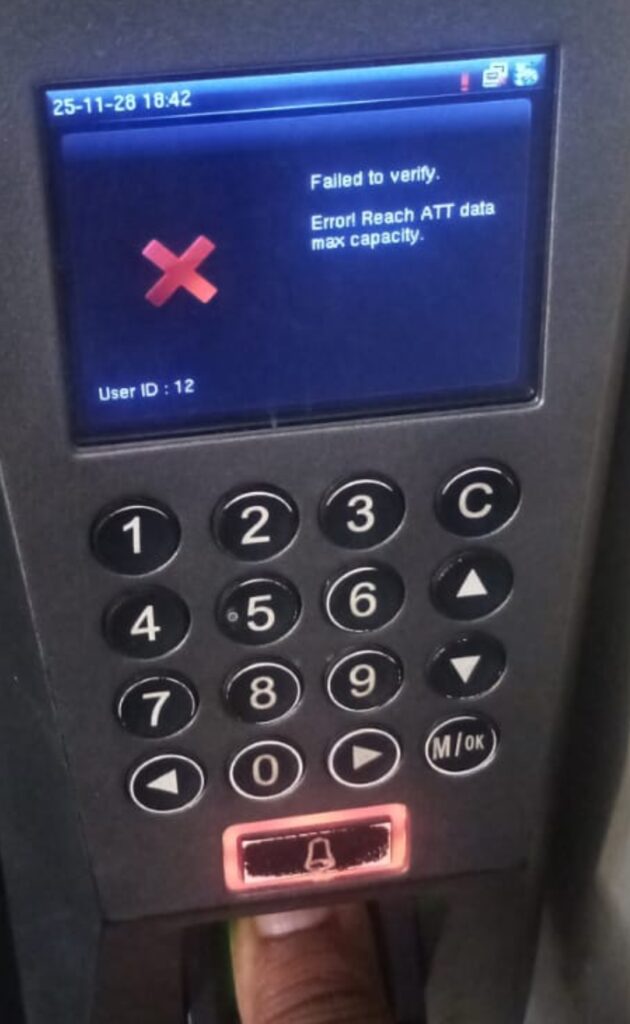
This error often appears when an employee attempts to clock in or out, only for the device to reject the verification process. Understanding what this error means and how to fix it is crucial for keeping your attendance system running smoothly.
At Boardtac Solutions, we specialise in the installation, configuration, maintenance, and repair of ZKTeco biometric time attendance devices across Kenya. In this blog, we explain why this error occurs, what it means for your organisation, and the steps to resolve it permanently.
What Does “Reach ATT Data Max Capacity” Mean?.
Every ZKTeco biometric terminal has a limited internal storage capacity. The device stores attendance logs such as clock-ins, clock-outs, break times, and user verification events. Over time, these logs accumulate in the internal memory.
The message “Reach ATT data max capacity” means that the device has reached its maximum storage space for attendance logs. Once this memory becomes full, the terminal cannot save any new records. As a result, employees attempting to verify their fingerprints, passwords, or cards may receive a failure message.
Simply put, the device storage is full, and no new attendance data can be recorded until space is cleared.
Why This Error Occurs in ZKTeco Time Attendance Devices.
Several reasons can trigger this error. Below are the most common causes:
1. Attendance logs have not been downloaded for a long time.
Most organisations forget to regularly download or back up logs from the biometric device into the attendance software. When logs accumulate for months, the system eventually fills up.
2. No automatic upload to software or cloud.
Some devices are not configured for automatic data transfer via LAN, Wi-Fi, or 4G. If the logs stay inside the terminal without syncing, memory fills faster.
3. High number of employees and daily verifications.
Larger organisations generate thousands of entries each month. Without proper management, the system hits max capacity quickly.
4. Improper device configuration.
Some devices are set to store logs for a long duration without auto-delete rules. This increases the likelihood of reaching memory capacity.
5. System administrator oversight.
In busy environments, administrators may forget to maintain the device until the issue causes verification failures.
Effects of This Error on Your Organisation.
When your biometric terminal reaches maximum capacity, the following issues arise:
- Employees cannot clock in or clock out.
- Payroll reports become inaccurate.
- HR teams struggle to track working hours.
- Some employees may be unfairly marked absent.
- The device may slow down or freeze.
- Overall user experience becomes stressful and inconvenient.
To avoid these disruptions, immediate action is required.
How to Fix the “ATT Data Max Capacity” Error.
Below are the recommended solutions used by Boardtac Solutions technicians when servicing ZKTeco devices.
1. Download all attendance logs.
Connect the device to your ZKTeco software such as:
- ZKTeco ZKTime.
- ZKTeco Time Attendance Pro.
- ZKBiotime Cloud.
Download all logs to your computer. After successful download, the device will clear internal memory and resume normal operation.
2. Manually delete logs from the terminal.
If software connection is not available, you can delete attendance records directly from the device menu. Deleting logs frees up storage so employees can continue clocking.
3. Enable automatic log upload.
We recommend configuring the device to upload logs automatically via:
- LAN network.
- Wi-Fi.
- 4G router or SIM card (if supported).
This reduces the chance of memory filling up again.
4. Upgrade or reinstall the attendance software.
Some older systems fail to sync data properly. Upgrading ensures consistent backups.
5. Increase storage capacity using cloud systems.
Using a cloud-based platform like ZKBiotime ensures logs are stored online rather than in the device.
6. Regular maintenance from Boardtac Solutions.
We provide scheduled maintenance to ensure your device never reaches full capacity again.
Preventing the Error in the Future.
To avoid repeated disruptions, follow these best practices:
- Download logs weekly or daily.
- Set the device to auto-delete after successful download.
- Ensure stable network connection for automatic syncing.
- Schedule monthly preventive maintenance.
- Train staff on correct device usage and reporting.
These simple steps will keep your biometric system efficient and reliable.
How Boardtac Solutions Can Help.
Boardtac Solutions is Kenya’s trusted partner for biometric attendance systems, including ZKTeco models such as K40, F18, F22, MB360, Uface 800, and many more. We provide full service across Nairobi, Kiambu, Machakos, Kajiado, Nakuru, and surrounding regions.
Our services include:
- Biometric system installation.
- Time attendance configuration.
- Data backup and system integration.
- Troubleshooting and repair of ZKTeco devices.
- Cloud attendance solutions.
- Software setup and user training.
If your device is showing “Error! Reach ATT data max capacity”, we can resolve it quickly and ensure that your attendance records remain accurate and uninterrupted.
ZKTeco biometric devices are reliable, but like any digital system, they require regular maintenance. The error “Reach ATT data max capacity” is simply a warning that the device memory is full. With the right support and preventive measures, the issue can be solved quickly and permanently.
At Boardtac Solutions, we ensure your time attendance system operates efficiently, accurately, and without downtime. For installation, maintenance, configuration, or troubleshooting, contact us today and keep your business running smoothly.