ZKTeco ZKBio CVAccess Professional Software in Kenya: A Complete Guide to Smart Biometric Access Control
Organizations across Kenya regularly send Boardtac Solutions requests to design, supply, install, configure, and commission professional biometric access-control systems for offices, hospitals, schools, warehouses, residential apartments, financial institutions, government facilities, data centres, and other secure environments.
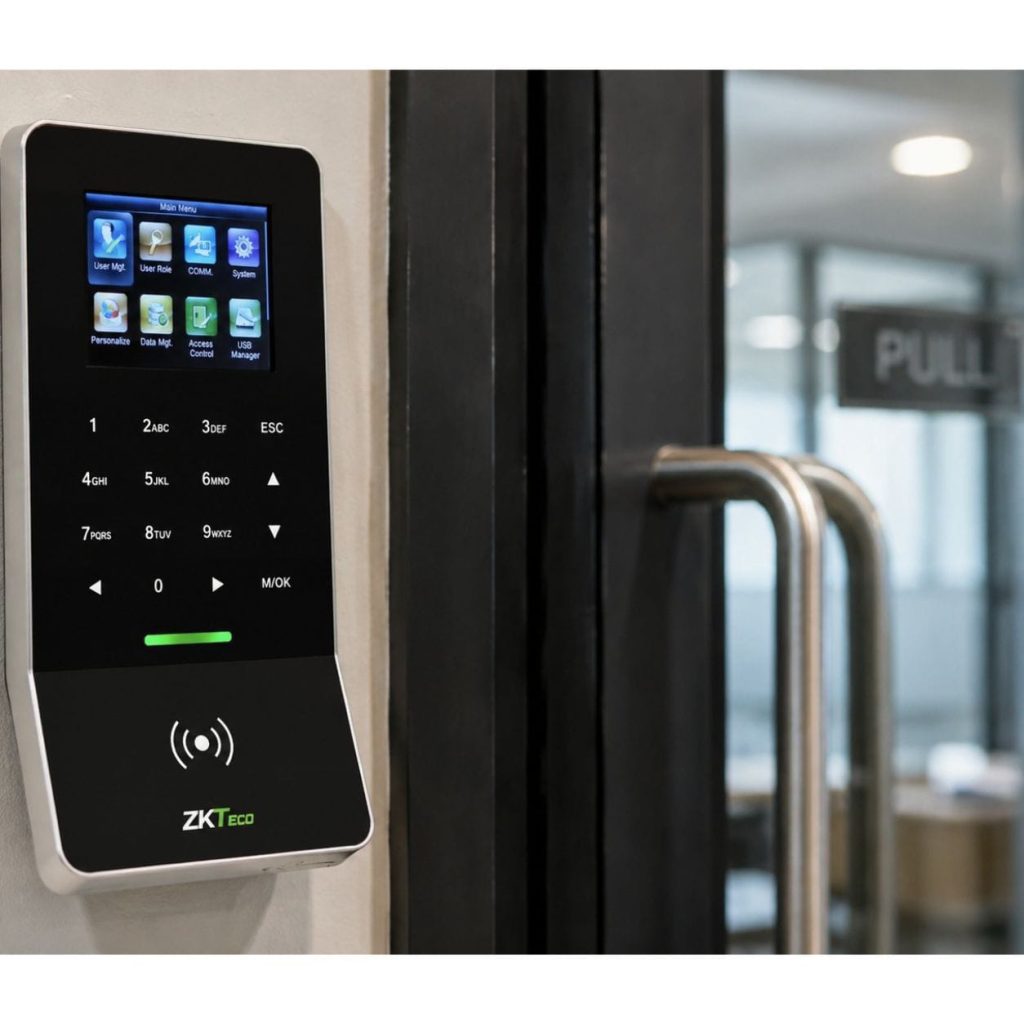
A typical requirement may include enterprise access-control software, biometric terminals, slave readers, electromagnetic locks, emergency exit accessories, dedicated power supplies, backup batteries, network cabling, installation materials, user training, testing, and commissioning.
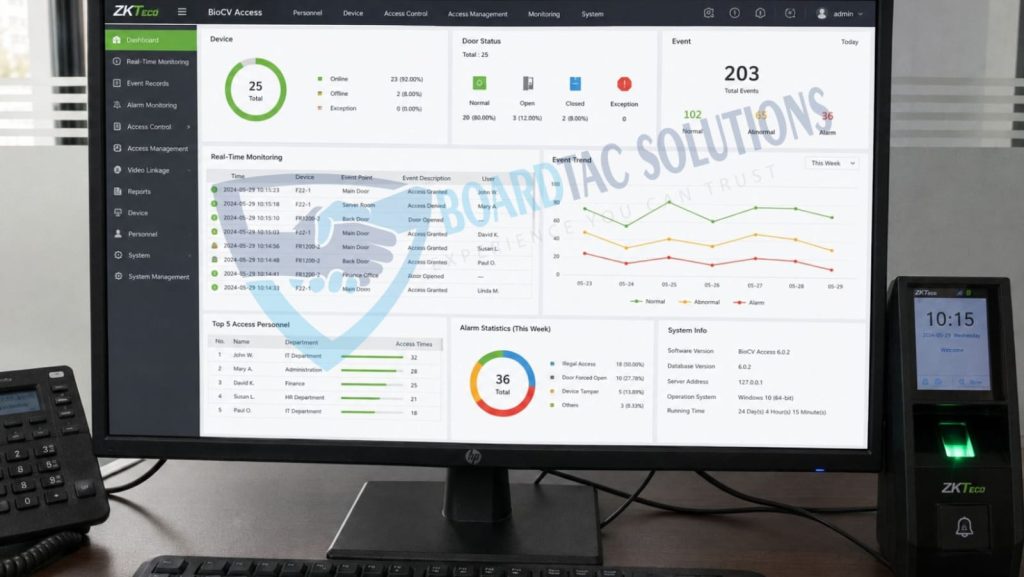
Some of the common components included in these requests are:
- ZKTeco ZKBio CVAccess Professional Software.
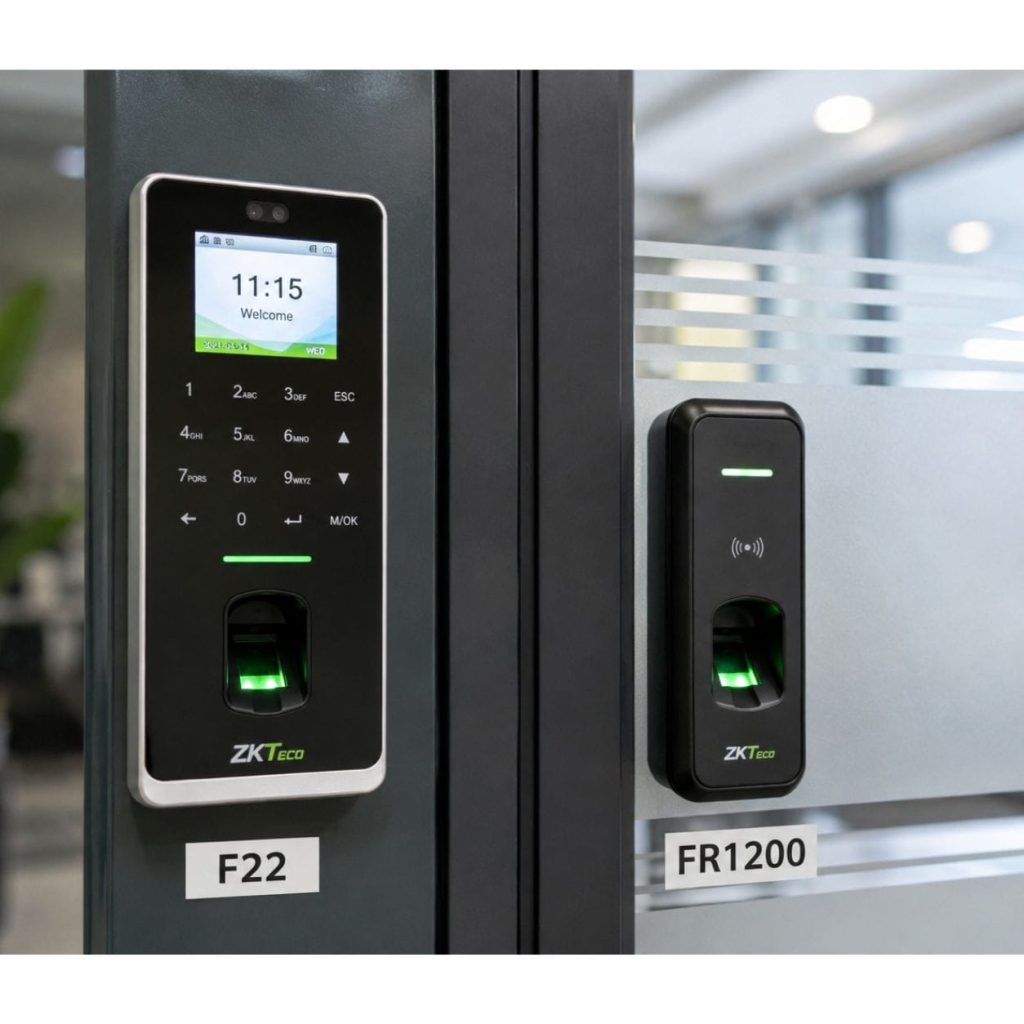
- ZKTeco F22 Advanced Master Biometric Terminal.
- ZKTeco FR1200 Slave Fingerprint Reader.
- Electromagnetic Lock, depending on the door and security requirements.
- Magnetic Lock Mounting Bracket.
- Override Key Switch.
- Door Closer.
- Emergency Break Glass Unit.
- Exit Push Button.
- Dedicated Access-Control Power Supply Unit with Backup Battery.
- Network Cabling, Trunking, and Installation Accessories.
- Installation, Testing, User Training, Documentation, and Commissioning.
While many organizations initially focus on the fingerprint reader or biometric terminal, the software is the central management platform behind a professionally designed access-control system. It helps administrators manage users, doors, permissions, schedules, access events, attendance records, and security information from one centralized platform.
In this guide, Boardtac Solutions explains how ZKTeco ZKBio CVAccess Professional Software works, why centralized biometric access control is important, and how compatible devices such as the ZKTeco F22 and ZKTeco FR1200 can be integrated into a secure, scalable, and professionally managed access-control solution.
What Is ZKTeco ZKBio CVAccess Professional Software?
ZKTeco ZKBio CVAccess Professional is a web-based access-control and time-attendance management platform designed to centrally manage compatible biometric devices, users, access permissions, attendance records, door events, alarms, and security reports.
Instead of programming every biometric device separately, authorized administrators can manage the system through a centralized software platform.
This can make it easier for an organization to manage multiple users, doors, departments, and locations while maintaining consistent access rules and records.
Depending on the selected license and system configuration, the platform may support multiple doors, personnel records, attendance devices, video channels, and client workstations.
The actual capacity of every installation should be confirmed against the specific software license and the organization’s requirements before deployment.
Why Access-Control Software Matters
Many buyers focus mainly on the biometric terminal installed at the door. However, the management software is responsible for organizing and controlling how the overall system operates.
A professionally configured access-control platform can help an organization manage:
- Who is authorized to access a particular door.
- Which doors each employee, visitor, contractor, or authorized user can access.
- The times and days when access is permitted.
- Department-specific access permissions.
- Restricted areas.
- Access schedules and holiday rules.
- Successful and unsuccessful access attempts.
- Door status and security events.
- Attendance information.
- Access logs and audit trails.
Without centralized management software, even an advanced biometric terminal may operate mainly as an individual or standalone device. Software provides the structure needed to manage access permissions more efficiently across a larger organization.
Key Features of ZKTeco ZKBio CVAccess Professional
Centralized User Management
Administrators can create and manage personnel records through a centralized platform rather than handling every user independently at every access point.
Where supported by the system configuration, user information can be synchronized with compatible biometric devices.
This can reduce administrative work, improve consistency, and make it easier to manage staff changes.
Web-Based Management
Because the platform is web-based, authorized administrators can access the management interface through a compatible browser on an approved workstation or network environment.
This can be useful for organizations with several departments, multiple access points, or more than one operational location.
Appropriate user permissions, network security, and system administration procedures should be applied to protect access to the management platform.
Door Access Management
Administrators can configure access rules based on the organization’s security requirements.
These may include:
- Assigning authorized users to specific doors.
- Restricting access to sensitive departments.
- Creating access schedules.
- Applying working-hour rules.
- Configuring holiday access arrangements.
- Managing door permissions.
- Monitoring access events.
- Reviewing access records.
The available functions depend on the software edition, license, compatible devices, and system configuration.
Time and Attendance Management
In suitable deployments, ZKBio CVAccess Professional can support time and attendance management alongside access control.
The system may be configured to record and organize information such as:
- Check-in times.
- Check-out times.
- Late arrivals.
- Overtime.
- Shift schedules.
- Attendance records.
- Attendance reports.
This can help organizations reduce dependence on manual attendance registers and improve the availability of digital attendance information.
Video Integration
Professional access-control systems may be integrated with compatible video surveillance systems where the required software license, devices, and configuration support this function.
Video integration can help security personnel review relevant footage when investigating access events or security incidents.
This can provide additional context when reviewing:
- Access attempts.
- Unauthorized entry concerns.
- Door alarms.
- Security incidents.
- Events requiring further investigation.
Event Logs and Audit Trails
A professionally managed access-control system can maintain records of important access and door events.
Depending on the system configuration, recorded events may include:
- Successful access.
- Failed authentication.
- Unauthorized access attempts.
- Forced-door events.
- Door-held-open events.
- Emergency door release events.
- Device or communication events.
- Other configured alarms.
These records can assist with security reviews, investigations, operational accountability, and internal reporting.
A Typical Professional Biometric Access-Control Configuration
The correct system design depends on the door type, security level, number of users, building layout, operational workflow, and future expansion requirements.
For a secure single-door application, a professionally designed solution may include the following components.
ZKTeco F22 Advanced Master Biometric Terminal
The ZKTeco F22 can be used as the main biometric access terminal in a compatible access-control installation.
Depending on the configuration, the terminal may support authentication methods such as:
- Fingerprint verification.
- RFID card verification.
- Password verification.
- Network communication.
The terminal can be configured according to the organization’s approved access rules and security requirements.
ZKTeco FR1200 Slave Fingerprint Reader
The ZKTeco FR1200 is a slave fingerprint reader designed for use with compatible ZKTeco access-control equipment.
It can be installed on the opposite side of a controlled entrance where biometric verification is required on both entry and exit.
This type of configuration may be suitable for areas where the organization requires stronger accountability for movement in and out of a restricted space.
Examples may include:
- Server rooms.
- Data centres.
- Research laboratories.
- Pharmaceutical facilities.
- Financial institutions.
- Secure storage areas.
- Restricted corporate departments.
The final design should also consider emergency escape requirements and applicable building and safety regulations.
Electromagnetic Lock
An electromagnetic lock, commonly known as a magnetic lock or maglock, secures a door using electromagnetic holding force.
When the access-control system grants access, the lock is released according to the configured system design, allowing the authorized user to open the door.
When the door closes, the magnetic lock can secure the entrance again.
The required lock size and holding force should be selected based on the door type, door frame, installation method, and security requirements.
Magnetic Lock Mounting Bracket
A suitable mounting bracket helps ensure that the magnetic lock is installed securely and aligned correctly with the door.
Proper installation can support:
- Correct lock alignment.
- Secure mounting.
- Reliable operation.
- Reduced mechanical stress.
- Improved long-term performance.
The correct bracket type depends on the door and frame design.
Door Closer
A door closer helps return the door to its closed position after it has been opened.
This is important because an access-control lock cannot secure a door that remains open.
A properly selected and adjusted door closer can support reliable door operation and reduce unnecessary strain on the locking system.
Emergency Break Glass Unit
An emergency break-glass unit provides a manual emergency release method for an access-controlled door.
In an appropriate system design, activating the emergency release can interrupt the lock circuit and allow the door to be opened.
Resettable emergency units can reduce replacement requirements after authorized testing or activation.
Emergency release arrangements must be designed and installed in accordance with the applicable safety requirements for the building and door.
Exit Push Button
An exit push button provides a simple method for leaving a controlled area where biometric verification is not required on exit.
The required exit method should be determined during system design based on the organization’s security procedures, operational requirements, and emergency escape considerations.
Override Key Switch
An override key switch may provide authorized personnel with a manual control option during approved maintenance, operational procedures, or specific emergency arrangements.
The function of the key switch should be clearly defined during system design and communicated to authorized users.
Dedicated Access-Control Power Supply
Professional access-control installations should use a suitable dedicated power supply designed for the connected equipment and system requirements.
A correctly selected power supply can help:
- Provide stable power.
- Support connected access-control equipment.
- Accommodate the required backup battery.
- Improve cable and power management.
- Support a cleaner and more organized installation.
The power supply capacity should be calculated according to the combined requirements of the biometric devices, locking equipment, accessories, and backup requirements.
Backup Battery
A backup battery can help maintain operation during a mains power interruption, depending on the system load, battery condition, and expected backup duration.
The actual backup time is affected by the number of connected devices, lock type, power consumption, battery capacity, and condition of the battery.
Backup performance should therefore be assessed as part of the system design rather than assumed.
Why Professional Installation Matters
Even high-quality biometric equipment may perform poorly if the system is incorrectly designed, wired, configured, or installed.
Professional biometric access-control installation involves more than mounting a fingerprint reader on a wall.
A complete installation may include:
- Site assessment.
- Door and frame evaluation.
- Access-control system design.
- Equipment selection.
- Cable routing.
- Trunking and cable management.
- Lock and bracket alignment.
- Power-supply installation.
- Backup-battery connection.
- Biometric device installation.
- Network integration.
- Software installation and configuration.
- User enrollment.
- Access-permission configuration.
- Security and operational testing.
- User training.
- Technical documentation.
- Final testing and commissioning.
Every component should be tested as part of the complete system before handover.
Industries Using Centralized Biometric Access Control in Kenya
Organizations across Kenya are increasingly adopting centralized biometric access-control solutions in environments such as:
- Hospitals.
- Banks and financial institutions.
- Schools and universities.
- Government institutions.
- Manufacturing facilities.
- Warehouses.
- Corporate offices.
- Hotels.
- Residential apartments.
- Data centres.
- Non-governmental organizations.
- Research facilities.
- Pharmaceutical facilities.
- Commercial buildings.
- Secure storage areas.
The appropriate system depends on the organization’s security risks, number of users, number of doors, operating procedures, and future expansion plans.
Common Questions About ZKBio CVAccess Professional
Can ZKBio CVAccess Professional Manage Multiple Doors?
The platform is designed for centralized access-control management and may support multiple doors depending on the selected license, compatible hardware, and system configuration.
The required number of doors should be confirmed before selecting the software license.
Can Staff Attendance Be Managed Through the System?
The platform can support time and attendance functions where the required software edition, license, devices, and configuration are in place.
Organizations should confirm their reporting and attendance requirements during system design.
Can Access Permissions Be Updated Centrally?
Centralized management allows authorized administrators to manage user information and access permissions through the software platform.
The exact process depends on the deployed devices, network configuration, and system setup.
Is the System Suitable for Future Expansion?
A properly designed access-control system can be planned with future growth in mind.
Additional doors, users, and compatible devices may be added where supported by the selected license, infrastructure, and system architecture.
Future expansion should be considered during the initial site survey and system design.
Can the System Be Used for Both Access Control and Attendance?
Depending on the selected software edition and configuration, the system may support both access-control and time-attendance functions.
This can help organizations manage related security and workforce information through a centralized platform.
Why Organizations Choose Boardtac Solutions
Installing a professional biometric access-control system involves much more than supplying hardware.
Boardtac Solutions provides complete biometric access-control solutions that may include:
- Professional site surveys.
- System design and planning.
- Genuine ZKTeco equipment.
- Biometric access-control software.
- Biometric terminal installation.
- Fingerprint and access-reader installation.
- Magnetic-lock installation.
- Access-control power systems.
- Backup-battery integration.
- Network integration.
- Software configuration.
- User enrollment.
- Access-permission setup.
- System testing.
- User training.
- Technical documentation.
- Testing and commissioning.
- Maintenance and after-sales technical support.
Every installation is designed around the client’s security requirements, operational workflow, building environment, number of users, access points, and future expansion plans.
Looking for ZKBio CVAccess Professional Installation in Kenya?
Whether you need to secure one office entrance or deploy a centralized multi-door biometric access-control system, selecting the right software, compatible hardware, and professional installation partner is important.
Boardtac Solutions designs, supplies, installs, configures, tests, and commissions complete biometric access-control systems using suitable ZKTeco solutions.
Our team helps ensure that the biometric terminal, slave reader, magnetic lock, power supply, backup battery, emergency accessories, network connection, and management software are designed and configured to operate as one complete system.
We also help organizations assess:
- The number of doors requiring access control.
- The number of users to be enrolled.
- The required authentication methods.
- Entry and exit control requirements.
- Attendance-management requirements.
- Security and audit requirements.
- Network and software requirements.
- Emergency-release considerations.
- Future expansion plans.
Why This Matters for Your Organization
A professionally designed biometric access-control system does more than open and lock doors.
It can help protect sensitive areas, strengthen accountability, improve access management, support attendance monitoring, reduce reliance on manual records, and provide useful access-event information.
By combining centralized access-control software, compatible biometric equipment, suitable locking hardware, properly designed power systems, and professional installation, organizations can build a secure and scalable access-control solution that supports their operational requirements.
For professional biometric access-control solutions in Kenya, Boardtac Solutions provides system design, equipment supply, installation, software configuration, testing, user training, commissioning, maintenance, and technical support.